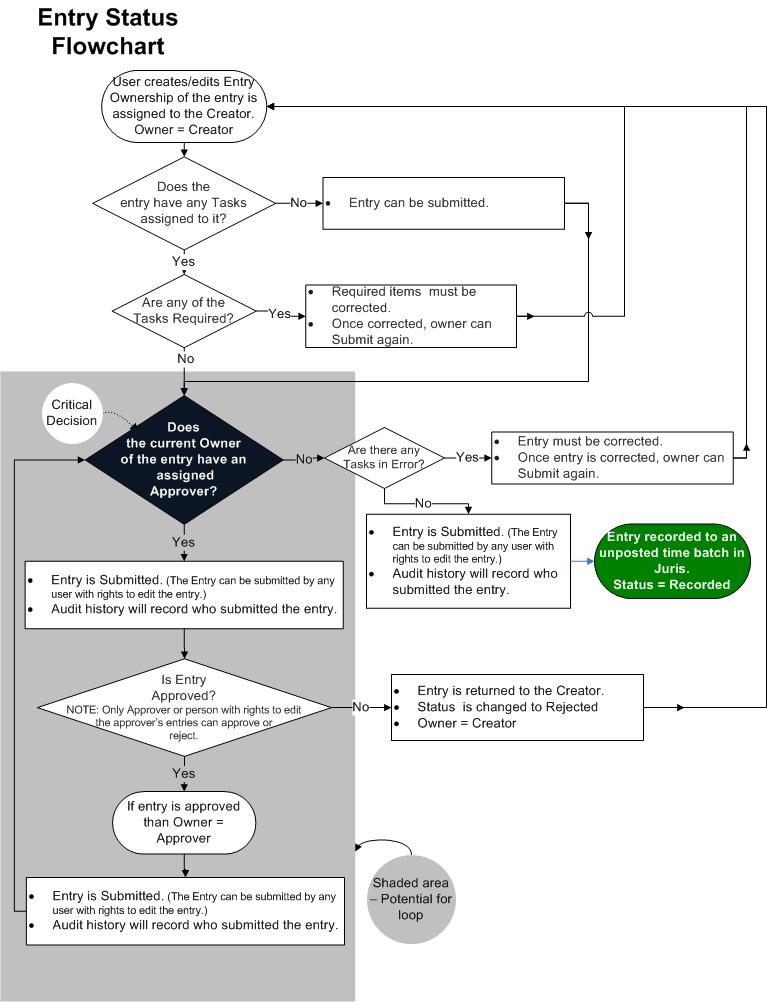
The flowchart outlines the process of time and expense entry creation and submission. There are two important areas to consider in the entry workflow:
- The area of the workflow that is on a gray background indicates an area where the potential for creating a loop exists.
-
The black diamond indicates the critical decision that can result in a loop.
Rules are run at the time the entry is being entered. There are certain Rule Severities that will not allow the entry to be submitted. Notice that if an entry has a 'Required' Task then the entry must be fixed in order to submit, EVEN if the Owner is Assigned an Approver. Also notice the workflow if the Owner does not have an Approver and there are Tasks with a Severity of Error. They must be fixed before being submitted. If there is an Approver and Tasks in 'Error', then the entry can be moved along. Once the Approver submits the entry, it is returned to the step in the workflow where the entry is reviewed for 'Required' Tasks, instead of being recorded in Juris. This is to ensure that the Approver did not make any changes to the entry that would be in violation of Rules.
Another important consideration is that a person who is an Approver may also have an Approver, therefore the entry must be returned to a point in the process where the rules can be run and the system can verify if another Approver is required. The occurrence of multiple Approvers is where the potential for a loop may exist.
For example, Ernie Attorney is set as the approver for Paula Paralegal’s entries; and Patrick Partner is set as the approver for Ernie Attorney.
When Paula submits an entry, Ernie is assigned as the Owner of the entry. Once Ernie approves the entry, Patrick is assigned as the Owner of the entry. When Patrick submits the entry, as long as Patrick does not have an approver assigned, the system will pass the entry through Juris rules to assure all required fields are complete. Then the entry will be recorded.
Now, let’s suppose that Patrick has decided to assign Paula as his Approver since she is a good proofreader and he likes to make sure that she reviews all his entries before they are submitted. Now a loop has been created. The answer to the critical decision: Does the current owner of the entry have an assigned approver? will always be YES, looping the entry endlessly through the approval process.
So, if your firm chooses to use Approvers, be aware that the potential for creating a loop does exist and should be avoided. At some point – the answer to the Critical Decision (Does the current owner of the entry have an assigned approver?) MUST be NO in order to escape the loop and allow the entry to be submitted.
Also note that once entries are recorded in Juris, they are recorded as unposted entries. At this point, although the entries may be edited from within Juris, they may no longer be edited in Juris Suite unless the entries are recalled.
When an entry is recalled, the entry will be returned to Juris Suite with the Status set to Draft and with the user who recalled the entry assigned as the owner of the entry. That returns the entry to the beginning step of the workflow above.