The Juris Suite Deployment Manager allows the Juris administrator to download software updates and "push-down" those updates to all users in the firm.
The Juris Suite Deployment Manager is available as part of the Juris Suite client install. Please refer to the Juris Suite Installation Guide.
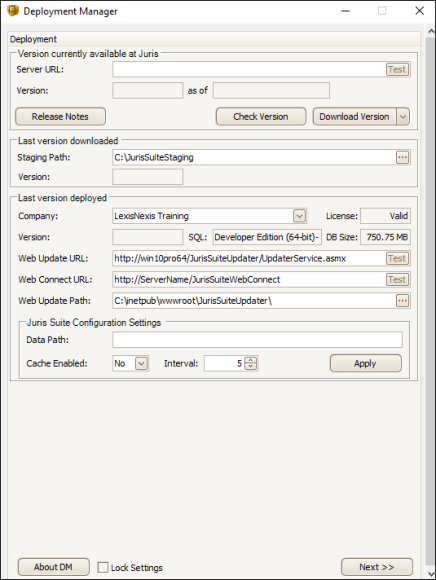
| Setting | Description |
|---|---|
| Version Currently Available at Juris | |
| Server URL | The server path from which software updates are retrieved |
| Version | The current version that is available for download |
| Last Version Downloaded | |
| Staging Path | Location where deployment files are downloaded |
| Version | Last version that was downloaded |
| Last Version Deployed | |
| Company | This is the company that you will be deploying. If you have multiple companies, you will see them in the drop down list. |
| Version | The version that is currently installed |
| SQL | The version of SQL that you have installed |
| DB Size | The size of your Juris database |
| Web Update URL | The web address where the application checks for updates |
| Web Connect URL | The address where the methods that support the web connect mode are housed |
| Web Update Path | The physical path of the web update URL |
| Juris Suite Configuration Settings | |
| Data Path | This is typically used in a Citrix or Terminal Server environment. Refer to the Juris Suite Installation Guide for details. |
| Cache Enabled | Determines if you are running with or without cache. Refer to the Juris Suite Installation Guide for details. |
| Interval | The time in minutes between cache synchronizations |